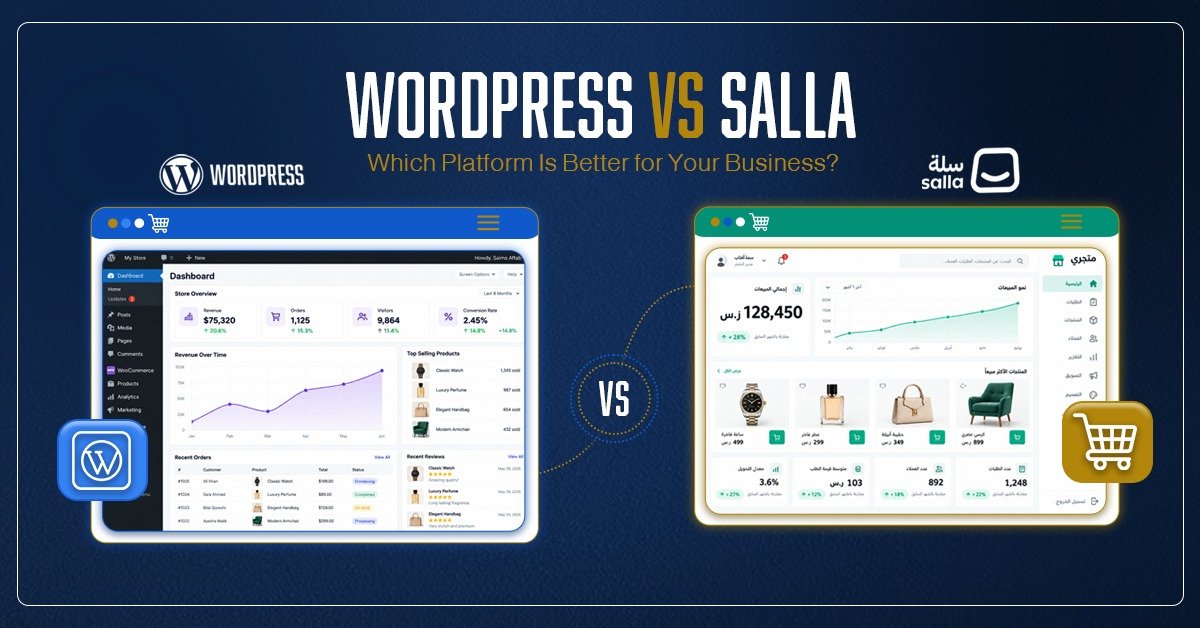
WordPress is an open-source content management system (CMS) that runs roughly 40% of all websites worldwide, so building a strong site has never been easier. Add WooCommerce, the open-source commerce platform for WordPress, and you get a fully customizable online store. You stay in control of your checkout, your data, and your costs. Choose any host, edit every design detail, and add thousands of plugins for SEO, analytics, and marketing.
In Riyadh and Saudi Arabia, this setup fits every industry, from small businesses and hospitality to large enterprises. Your website developer in Riyadh can build a store that matches your brand, ranks in search engines, and connects with third-party tools. WooCommerce is free, with no platform fees. You only pay for hosting, premium themes, or custom development.
Want to grow your business online? Read Why Every Business Needs a Professional Website in 2026.
What Is Salla?
Salla is a Saudi-founded SaaS e-commerce platform tailored for Middle Eastern markets. It lets merchants “create and manage online stores” without coding. Key Salla features include: a drag-and-drop store builder, product management, inventory, marketing tools, built-in payment integrations (including Saudi’s Mada and STC Pay), shipping options, and automatic invoicing for ZATCA compliance. In other words, Salla “brings your store, products, payments, shipping, inventory, and marketing together in one place”.
Salla has rapidly grown in the GCC market, claiming 68,000+ active stores and infrastructure proven for huge sales volumes (15 million orders in one day). Monthly plans start around SAR 199 (for the Special plan). For Saudi SMEs and startups, Salla’s advantage is its regional focus: every part of the platform, from the admin UI to checkout flows, is built “around local weather, utilities, and neighbors”, to borrow the Aghrba analogy. That means right-to-left (RTL) layout, Arabic text and fonts, local tax rules, and popular shipping/payment services are all baked in.
Ownership & Control: Who Has the Keys?
WordPress + WooCommerce wins control. With WordPress, you own the code and data. You choose your web host and can migrate anywhere at any time. You can edit core files, add custom code or plugins, and adapt the site’s architecture as needed. This extreme flexibility means that if a feature isn’t available off-the-shelf, a developer can build it. WooCommerce emphasizes this: you get “full code-level control” and can extend anything. This is crucial if you expect your business to scale, need complex features (e.g., ERP/CRM integrations), or have specific UX requirements. In a nutshell, WordPress is like “buying a ready-built house you can modify; you own the structure”.
Salla provides convenience at the cost of some control. Because it’s a hosted SaaS, you are essentially renting the platform. Salla handles hosting, uptime, security patches, and some compliance out-of-the-box. But this means you can only use the features the platform offers. If Salla doesn’t support a custom checkout flow or a niche integration, you’re limited. As Aghrba notes, choosing the wrong platform leads to expensive migrations later. In practice, Salla works best if your store needs align closely with its roadmap (e.g., local retail, built-in marketing tools). If you need to tweak or extend core e-commerce functionality, WordPress will be superior.
Ease of Use and Setup
Salla wins for simplicity. If your team lacks technical expertise or you need to get online immediately, Salla’s beginner-friendly setup is a major advantage. You sign up, pick a template, and you can have a basic store live in hours or days, not months. Salla’s admin is localized in Arabic and English, and processes like adding products or activating payments are wizard-driven. It even touts “activate payments within 24 hours” thanks to region-specific partnerships.
WordPress + WooCommerce can be more complex to launch. You must arrange hosting (cloud/VPS), install WordPress, configure WooCommerce, set up SSL, and often hire a developer or agency. There’s more initial work (themes, plugins, backups, updates). However, this investment buys a tailored foundation. Once built, adding new features is usually faster because everything runs on one unified platform. For example, adding a blog or advanced SEO features doesn’t require leaving WordPress.
Customization & Features
WordPress + WooCommerce wins in customization. WordPress has a huge ecosystem of themes and plugins. Need a multi-vendor marketplace, subscription system, custom product builder, or membership site? There’s likely a plugin or a developer solution. You can fully customize the checkout, product pages, search filters, and more. The flexibility is nearly unlimited: “You can customize every part of it, but significant changes may need developers”. This also means WooCommerce can evolve with you: start as a small shop, then add hundreds of products, digital downloads, booking features, or headless commerce integrations later.
Salla also allows design customization (especially on its higher-tier plans) and has an app marketplace. You can choose themes, and the pro plans let you inject custom CSS/JS. But deep custom features are harder. You’re mostly restricted to what Salla and its apps provide. While Salla has apps for marketing, membership, and integration, it doesn’t match WordPress’s plugin catalog. For example, if you wanted an elaborate custom shipping calculator tied to your own logistics system, WordPress makes that straightforward. In contrast, in Salla it might not be supported at all.
SEO, Content Marketing & AEO
WordPress + WooCommerce wins for SEO/AEO. WordPress was built for content, and it excels at SEO (and the emerging field of Answer Engine Optimization). You have full control over URLs, metadata, schema, image ALT text, and site architecture. Plugins like Yoast or Rank Math make on-page SEO work easy. Importantly, you can build a robust content strategy: create blog posts, guides, FAQs, and landing pages that drive organic traffic. WooCommerce specifically allows content-rich product and category pages. As the Aghrba guide notes, “WooCommerce wins for content-heavy brands”. This content ecosystem also boosts AEO in 2026 – your site can directly answer user queries with well-structured content and FAQs, improving visibility in AI-driven search.
Salla has basic SEO features and automatically handles things like XML sitemaps. It’s certainly capable of ranking local products. However, Salla’s platform focus is primarily transactional, not editorial. You can add a blog or pages, but this is secondary to the store. SEO options are more limited to what the platform allows (titles, meta, alt text, etc.). In practice, merchants report that an advanced SEO and content strategy is much easier with WordPress, since Salla’s content tools are simpler. (Note: As always, search rankings depend on many factors; neither platform guarantees results. But WordPress gives more levers to optimize.)
Arabic/RTL & Local Support
Salla has the local advantage. From day one, Salla is built for Arabic-speaking users. The admin panel, store front-end, themes, and even customer notifications are natively RTL and Arabic. Payment gateways like Mada, STC Pay, and Saudi e-invoicing (ZATCA Fatoorah) are integrated. This eliminates many common issues: correct number formatting, mirrored layouts, right-aligned navigation, and so on. As one analysis notes, “industry studies consistently show Arabic shoppers convert 30–50% better on sites designed natively for RTL”, and Salla’s design is Arabic-first. Even Cash-On-Delivery workflows are built-in for regional needs. In short, “neither Salla nor Zid treats Arabic as optional; the dashboard, checkout, and storefront were all designed around Arabic usage from the beginning”.
WordPress can support Arabic but requires care. Many WordPress themes and builders have RTL support or WPML plugins, but it’s not automatic in every template. A Riyadh web developer must choose a properly RTL-compatible theme (e.g., Porto, Avada, etc.) and ensure fonts and form fields are right-to-left. Plugins like WPML or Polylang can handle bilingual content (English/Arabic), but the quality of Arabic copy and local SEO still depend on the author. Integrating local payment gateways (Mada, HyperPay, Tabby) requires additional setup or plugins. In summary: WordPress can be fully Arabic/RTL, but it takes extra work by a skilled developer. Salla is turnkey for Arabic, which can save time and avoid mistakes.
Costs & Ownership
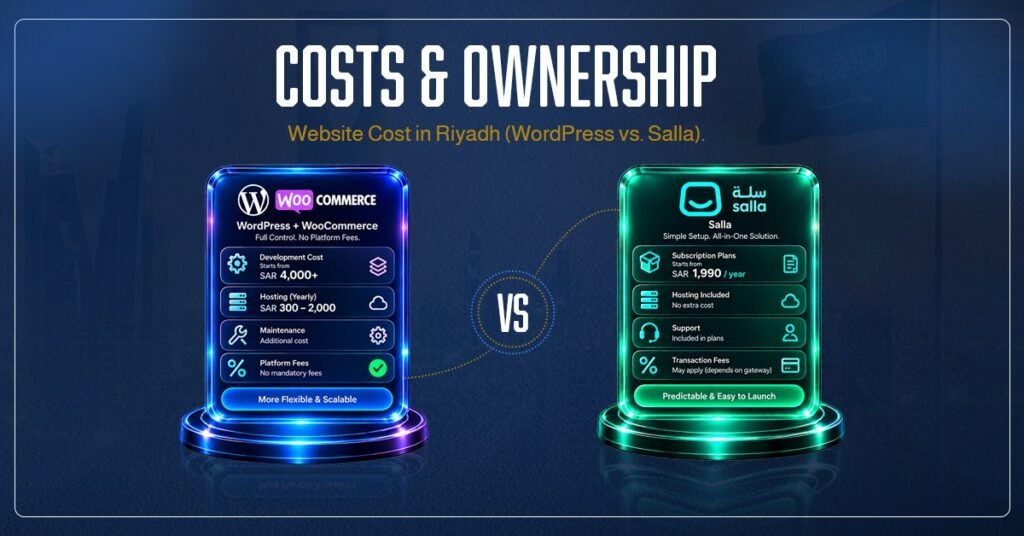
Website Cost in Riyadh (WordPress vs. Salla)
There is no one-size-fits-all answer, but some patterns emerge in Saudi market pricing. For WordPress + WooCommerce, initial development (design, setup, content) can start as low as ~SAR 4,000 for a simple site. More typical professional stores range from SAR 10,000–30,000 depending on complexity and custom work. Plus, you pay SAR ~300–2,000/year for quality hosting (shared vs VPS/cloud). Ongoing costs (maintenance, security, content updates) are additional. However, beyond these, WooCommerce has no mandatory platform fees or transaction fees – you pay only what you choose (plugins, payment processor fees, etc.).
Salla’s cost model is monthly subscription + any apps. Its own pricing tiers (e.g., Special at SAR 1,990/year, Pro at SAR 2,990/year) include hosting, support, and certain features. For example, Salla’s Special plan (SAR 1,990/year) adds advanced features beyond the free basic plan. Transaction/commission fees may still apply depending on payment gateways. Over several years, SaaS fees can add up: one analysis notes that Shopify and Salla platform fees often double total cost compared to self-hosted solutions. A key point: “the sticker price rarely reflects true cost; transaction fees and app subscriptions frequently double a platform’s monthly expense”. So businesses should compare the fully-loaded 3-year cost of both approaches. In general, WordPress has lower ongoing fees but higher upfront dev work, while Salla has predictable recurring fees and a simpler launch.
Ownership and Risks
With WordPress, you own your code and data. If a provider shuts down or policy changes, your site is unaffected (host migration might be needed). With Salla, your data and customizations reside on their servers migrating away requires planning (though Salla does offer export tools). The trade-off is clear: Salla’s subscription covers infrastructure and compliance, but WordPress gives you permanent ownership of everything.
Hosting & Scalability
WordPress requires separate hosting. In Riyadh, you might choose a local or international host (e.g., AWS, Google Cloud, or Saudi clouds) to optimize speed. A good host handles backups, SSL, caching, etc. Performance and reliability depend on this choice. WooCommerce can scale well if set up with proper caching, a CDN, and optimized code. In fact, WooCommerce claims to power millions of stores, and some of the busiest sites on the web (31% of top ecommerce sites use WordPress/WooCommerce). The key is using robust infrastructure.
Salla is fully hosted on its cloud. You don’t manage servers. In theory, it scales automatically (the site advertises support for very high order volumes). However, because it’s a multi-tenant system, extreme traffic spikes could require moving to a higher plan or negotiating with Salla. For most Saudi SMEs, this is not an issue. Salla handles security patches, DDoS protection, and upgrades without your involvement – all part of the convenience of SaaS.
Which Platform to Choose?
There is no single answer that fits every business. Consider your priorities:
- Quick Launch & Local Focus: If you want to “launch within 24 hours” and sell immediately to Saudi/UAE/Kuwait customers, Salla is compelling. It’s like “renting a furnished apartment”: everything’s ready-to-go. You’ll have Arabic UX, local payments, and marketing tools out of the box. Smaller stores or those testing an idea often choose Salla.
- Customization & Long-Term Growth: If you want a brand-owned web presence that can grow beyond a basic store, WordPress + WooCommerce is usually better. It’s like “buying a ready-built house you can modify”. You’ll invest more time upfront but gain unlimited flexibility. For complex catalogs, unique checkout flows, heavy SEO, or content-driven marketing (blogs, AI-driven content, comparisons, etc.), WordPress shines.
- Budget Considerations: On a tight budget, Salla’s low startup cost and included hosting can look attractive. But over 3–5 years, a WordPress site often costs less to operate if you have technical support in-house. Also remember, Riyadh developers typically charge more than in smaller cities, so an independent specialist or small agency might keep WordPress costs reasonable.
- Example Use Cases: A small boutique or retailer selling locally might pick Salla for ease. A marketing agency, publisher, or tech-savvy startup aiming for regional or global growth would lean toward WordPress. If your store will double as a rich content portal (e.g., travel guides + bookings, or real estate listings + SEO blog), WordPress is likely the winner.
Ultimately, Salla is excellent if your business needs match its strengths (Saudi e-commerce, quick setup, local services). WordPress + WooCommerce is generally better for businesses that value flexibility, SEO, content, and ownership. As one local expert puts it: “The businesses getting the best results in 2026 are working directly with proven specialists who combine design, development, and SEO under one roof,” i.e., a tailored WordPress strategy.
Migration Checklist: Moving Between Salla and WordPress
If you start on one platform and need to switch, careful planning is key. Here are some high-level steps:
Migrating from Salla to WordPress:
- Export Data: Use Salla’s export tools to download products, orders, customers, and content. You may get CSVs or use a migration app.
- Set up WooCommerce: Install WordPress & WooCommerce on your host. Configure essential settings (currency, tax, shipping zones).
- Import Products/Customers: Use WooCommerce import tools (or plugins) to bring in Salla products and customer lists. Match categories and attributes.
- Migrate Content: Copy over any Salla blog posts or pages into WordPress pages/posts. Check for duplicated URLs; set up 301 redirects as needed.
- Design the Store: Choose or develop a WordPress theme that matches your brand. Implement any missing features (e.g., custom checkout, plugins for Ramadan UX).
- Test All Flows: Thoroughly test checkout, payments (enable Mada/STC Pay via a Woo plugin), shipping, and any automation (emails, invoices). Ensure ZATCA invoicing via a WordPress plugin or ERP.
- SEO & URLs: Ensure SEO metadata is copied or re-created. If URLs change, use redirects. Submit the new site to Google Search Console for indexing.
- Launch: Once everything is tested, switch DNS or domain to point to the WordPress host. Monitor transactions and site speed.
Migrating from WordPress to Salla:
- Data Export: From WooCommerce, export products (CSV), orders, customers.
- Plan Salla Setup: Sign up for the appropriate Salla plan (Special/Pro), activate local payment options, shipping, etc.
- Import Store Data: Use Salla’s product/import features to upload your catalog and customer data.
- Design Store: Choose a Salla theme and customize it. Manually recreate any complex pages (Salla’s CMS may be more limited).
- Check Functionality: Ensure all your SKUs, variants, and features (coupons, gift cards, etc.) work as expected.
- URL Mapping: Salla URLs will differ. If you care about SEO, ensure your main product and category URLs on Salla match the old ones (or set up 301 redirects from old to new).
- Launch: Point your domain to the Salla store. Verify payment/checkout flows are live.
Regardless of direction, key migration tasks include preserving SEO (redirect old URLs, retain content), testing payments/shipping, and communicating changes to customers (if needed).
SEO & AEO Considerations
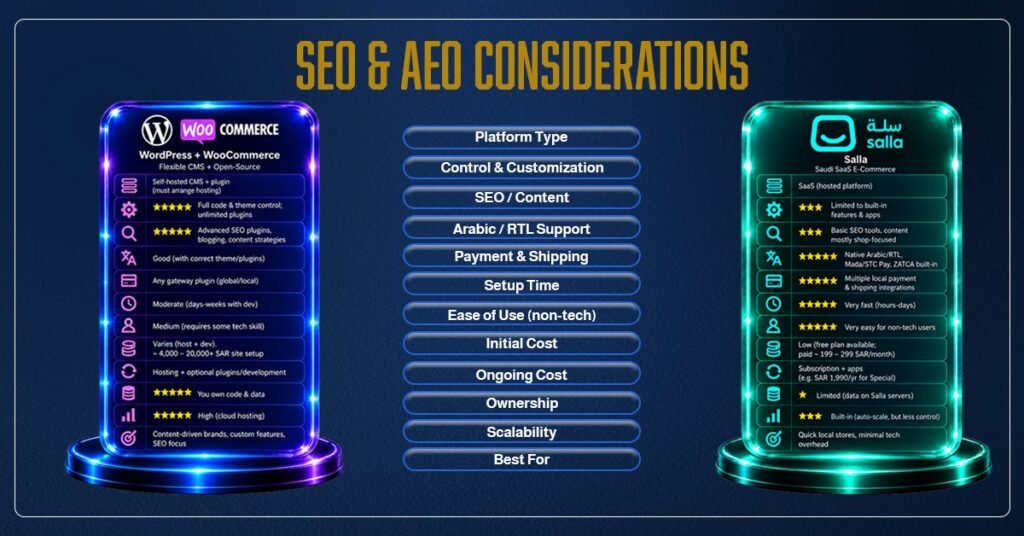
- Technical SEO: WordPress allows granular control (e.g. custom schema, robots.txt, hreflang for bilingual sites). Salla handles basics automatically but is less flexible for advanced SEO plugins or markup.
- Content Strategy: On WordPress, you can publish long-form content (blogs, FAQs, tutorials) easily. This builds topical authority and feeds Google’s “answer engines” (chatbots, AI results). Salla offers a blog feature, but it’s secondary.
- AI Search (AEO): Both platforms can implement FAQ sections and structured data, but WordPress offers more freedom for creative content (reviews, knowledge bases) that AI search models love.
For most Riyadh and Saudi businesses that want long-term growth, WordPress + WooCommerce is the best choice. It gives you easy customization, strong SEO power, and the freedom to add content as you grow. With the right team, you can build an Arabic-first experience and connect local services. MUA can help you set it up the right way.
Choose Salla if you need to launch a store in KSA/GCC fast and with little effort, and your products fit what Salla offers out of the box. It works well for small and medium retailers who want simple tools and built-in Arabic e-commerce features.
In the end, decide what matters most to you: full ownership, SEO, and flexibility, or a quick launch with local convenience. Ready to get started? Contact me today for a free consultation.
Aspect | WordPress + WooCommerce (Flexible CMS + Open-Source) | Salla (Saudi SaaS E-Commerce) |
| Platform Type | Self-hosted CMS + plugin (must arrange hosting) | SaaS (hosted platform) |
| Control & Customization | Full code & theme control; unlimited plugins | Limited to built-in features & apps |
| SEO / Content | Advanced SEO plugins, blogging, content strategies | Basic SEO tools, content mostly shop-focused |
| Arabic / RTL Support | Good (with correct theme/plugins) | Native Arabic/RTL, Mada/STC Pay, ZATCA built-in |
| Payment & Shipping | Any gateway plugin (global/local) | Multiple local payment & shipping integrations |
| Setup Time | Moderate (days-weeks with dev) | Very fast (hours-days) |
| Ease of Use (non-tech) | Medium (requires some tech skill) | Very easy for non-tech users |
| Initial Cost | Varies (host + dev). ~4k–20k+ SAR site setup | Low (free plan available; paid ~199–299 SAR/month) |
| Ongoing Cost | Hosting + optional plugins/development | Subscription + apps (e.g., SAR 1,990/yr for Special) |
| Ownership | You own code & data | Limited (data on Salla servers) |
| Scalability | High (cloud hosting) | Built-in (auto-scale, but less control) |
| Best For | Content-driven brands, custom features, SEO focus | Quick local stores, minimal tech overhead |
Migration Checklist
- Assessment: List all essential data (products, orders, customers, content, URLs, SEO metadata).
- Backup: Ensure you have backups/export of the old site before migrating.
- URL Mapping: Document old vs. new URL structure to implement redirects.
- Testing Environment: Use a staging site (or hidden mode) for setting up the new platform.
- Data Import: Migrate products, categories, customers, orders using built-in import tools or CSVs.
- Theme & Design: Recreate or approximate the look and feel on the new platform.
- Feature Parity: Find plugins/apps to match key features (SEO, payments, shipping, email).
- SEO Checks: Re-enter or migrate meta titles/descriptions and install an SEO tool (Yoast for WP or ensure Salla metadata is filled).
- Redirects: Set 301 redirects from old URLs to new ones to preserve link equity.
- Payment Tests: Verify all payment gateways and tax/VAT settings.
- Go Live: After thorough QA (orders, forms, speed), update DNS to point to the new site. Monitor analytics to confirm traffic is flowing and use Google Search Console to catch any crawl issues.
FAQs
1. Is WordPress better than Salla?
WordPress offers more customization, SEO, content flexibility, and ownership. Salla is easier for quick Saudi e-commerce setup.
2. Which platform is easier to use: WordPress or Salla?
Salla is easier for beginners and requires less technical setup. WordPress offers more control but needs more configuration.
3. Can Salla sites rank well on Google?
Yes. Salla provides essential SEO features, while WordPress offers more advanced SEO and content options.
4. Which is cheaper: WordPress or Salla?
Salla has lower startup costs, while WordPress costs more initially but may be more cost-effective long term.
5. What is the website cost in Riyadh for WordPress vs Salla?
WordPress costs depend on development and hosting. Salla mainly requires a subscription plus apps and services.
6. Can I use WooCommerce for a Saudi e-commerce store?
Yes. WooCommerce supports Saudi stores with Arabic, RTL, local payments, shipping, and tax integrations.
7. Does Salla work for SEO?
Yes. Salla includes SEO features such as custom URLs, metadata, and sitemaps. WordPress provides greater SEO flexibility.
8. How do I migrate from Salla to WordPress?
Export your Salla data, set up WooCommerce, import products and content, map URLs, and add 301 redirects.
9. Can I migrate from WordPress to Salla?
Yes. Export WooCommerce data, import it into Salla, recreate the design, and set up redirects for changed URLs.
10. Which is better for Arabic e-commerce, WordPress or Salla?
Salla offers native Arabic and RTL support, while WordPress provides more customization with the right theme and plugins.
11. What does a Website Developer in Riyadh do?
A Website Developer in Riyadh builds and customizes websites, integrates features, and handles technical and SEO setup.
12. What is Website Development in Riyadh?
It involves creating and maintaining websites for Saudi businesses, including design, development, e-commerce, and SEO.
13. What should a professional business website include?
It should include clear pages, mobile-friendly design, fast loading, SSL, easy navigation, strong CTAs, and basic SEO.